WhatsApp Automation

Turn WhatsApp conversations into automated journeys

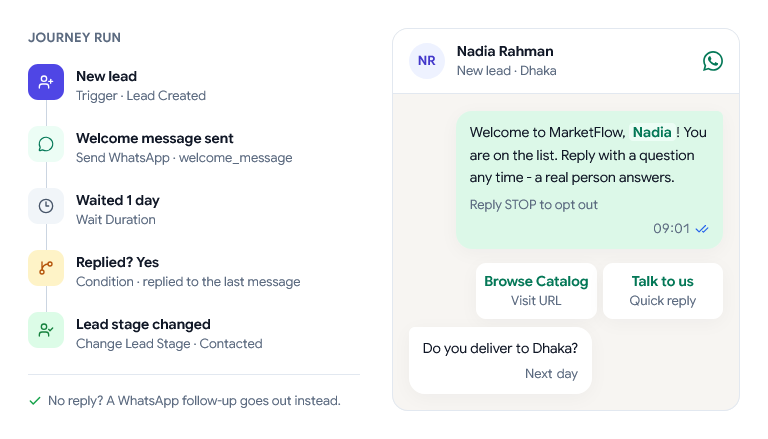
One WhatsApp journey. A new lead, Nadia Rahman, receives the welcome message template, the workflow waits one day, Nadia has replied, so the lead stage changes to Contacted. If she had not replied, a WhatsApp follow-up would be sent instead.

Automation journeys

Build the follow-up once. Let it run for every customer

Start with a customer event, wait when needed, and send the next message or hand the chat to your team.

  • Start on a new contact, a keyword in a message, or an order.
  • Wait from a minute up to 30 days between steps.
  • Add tags, assign the chat, update the order or notify your team.
An example journey: Trigger: New Contact (Starts when a contact is created), then Send WhatsApp: Welcome Message (An approved template), then Wait Duration: Wait 1 Day (Pauses the journey), then Add Tag: Welcomed (Tags the contact).

Templates

Every WhatsApp message, ready when the moment arrives

Create approved message templates once, personalize them with customer details and reuse them across campaigns and automations.

Template library

Interactive example
welcome_messageTo Nadia Rahman · WhatsApp
Preview of welcome_message, Approved: Welcome to Northwind, Nadia! You are on the list. Reply with a question any time - a real person answers. Reply STOP to opt out. Buttons: Browse Catalog (Visit URL), Talk to us (Quick reply).

Preview with sample customer data

  • {{company}}is shown asNorthwind
  • {{name}}is shown asNadia

Template details

Category
Marketing
Language
English (US)
Use case
Welcome
Status
Approved
Variables
2
Buttons
2
  1. Write
  2. Review
  3. Reuse (current)

Templates are reviewed by Meta before they can be sent.

WhatsApp campaigns

Send timely messages to the people who should receive them

Choose the right audience, personalize the message and send now or schedule the campaign for later.
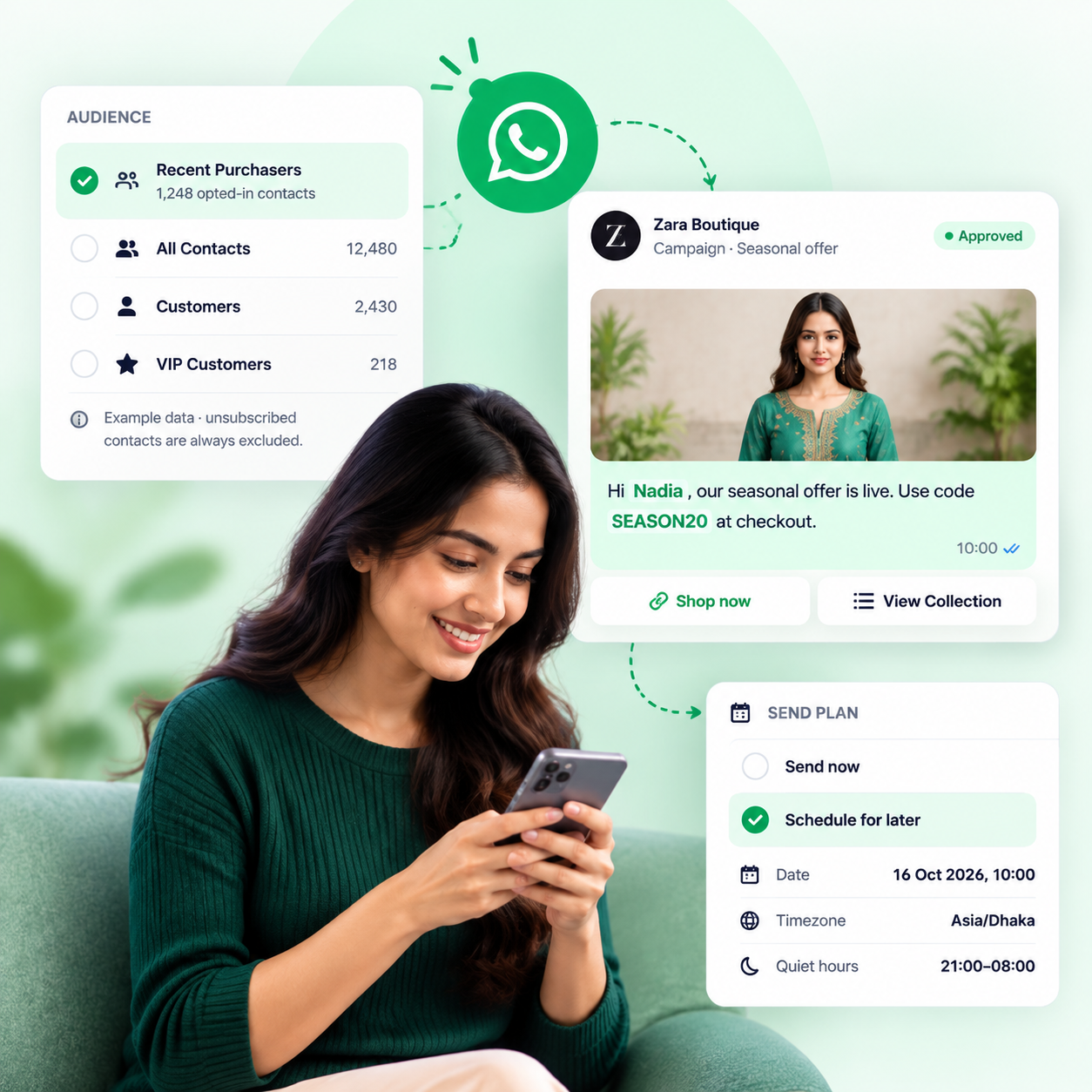
  • Choose a saved audience or customer group.
  • Fill approved templates with customer details.
  • Send now or schedule for later.
Explore campaigns
An illustration of a WhatsApp campaign being set up, with example data. Audience: Recent Purchasers, 1,248 opted-in contacts, selected. Message from Zara Boutique: "Hi Nadia, our seasonal offer is live. Use code SEASON20 at checkout." with the buttons Shop now and View Collection. Send plan: scheduled for later on 16 October 2026 at 10:00 in the Asia/Dhaka timezone.
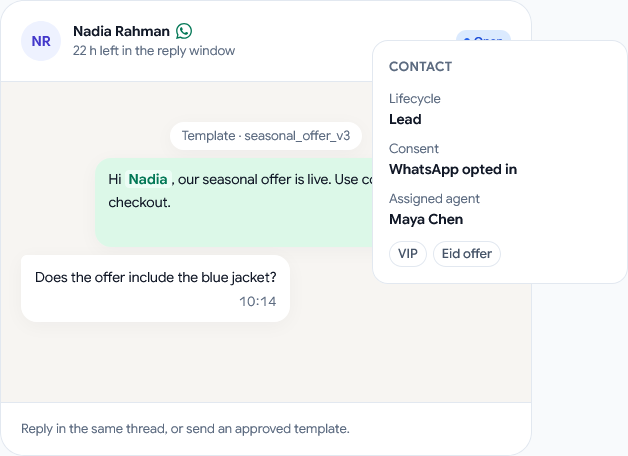
A WhatsApp conversation in the shared inbox, with example data. Nadia Rahman has replied to a campaign message and the conversation is open, with 22 hours left in the reply window. Beside it, her contact details show a VIP tag, her opted-in consent and Maya Chen as the assigned agent.

Team handoff

When a customer replies, your team has the full context

Continue the same WhatsApp conversation in the shared inbox, with the customer, owner and next action visible together.

  • Replies land in the same WhatsApp thread
  • Tags, consent and owner sit beside the conversation
  • Assign a teammate yourself and close the conversation when it is done
  1. WhatsApp campaignThe message goes out
  2. Customer replyThe customer answers
  3. Shared inboxSame thread, same number
  4. Assigned teammateSomeone owns the next step

Performance

See what happened after every message

Track delivery, reads, replies and conversions so you know how each WhatsApp campaign and automation performed.

  • Delivery is visible, message by message.
  • Replies are measured against what was delivered.
  • Template results stay connected to the campaign.

98.4%deliveredExample WhatsApp campaign · Summer Sale 2026

Example WhatsApp report for the running Summer Sale 2026 campaign: 11,840 sent, 11,652 delivered, 8,420 read, 1,284 replies and 188 failed. Delivery rate 98.4%, reply rate 11.0%. The best template by conversions, seasonal_offer_v3, has 1,642 conversions from 2,636 replies.

Connected modules

Why choose us

Built for businesses that want to grow

Stop juggling apps, spreadsheets and reminders. Use one workspace that turns chats into customers, so you can grow faster with less work.

  • Talk to Customers

    Answer WhatsApp, SMS and Messenger chats from one place

  • Automate the Busy Work

    Set up automatic follow-ups and messages, no coding needed

  • Customers & Leads

    Keep leads, customers, groups and history in one place

  • Clear Reports

    See your chats, campaigns and sales as they happen

  • Made for Real Shops

    Sell products, services or digital goods

  • Safe and Private

    Your data stays in your workspace, and you decide who sees what

Ready to start?

Turn every chat into a sale

Bring your chats, campaigns, automation, products and sales together in one place